Private Links
Private Links allow Airbyte Cloud to securely connect to your data sources and destinations without using the public internet or exposing IPs. Traffic between Airbyte and your resources stays entirely within your cloud provider's private network, providing enhanced security for organizations with strict network isolation requirements.
Private Links is an add-on feature for Airbyte Cloud, and requires the Pro plan or above. To enable Private Links for your organization, talk to sales.
Why use Private Links
Most Airbyte customers don't need to use Private Links. However, some organizations maintain a heightened security posture and more comprehensive data protection, but still want to benefit from the simplicity of cloud infrastructure and SaaS. Private Links are an excellent choice for organizations that can't expose systems and data to the public internet.
Private Links offer several advantages for security-conscious organizations.
-
No public IP exposure: Your data sources and destinations remain private. You don't need to assign public IP addresses or open firewall rules to the internet.
-
Traffic stays on your cloud provider's network: All data transferred between Airbyte and your resources travels through the cloud provider's private backbone, never traversing the public internet.
-
Simplified network security: Instead of managing complex firewall rules and IP allowlists, you control access through the cloud provider's native endpoint service permissions.
-
Reduced attack surface: By eliminating public endpoints, you reduce the vectors for unauthorized access to your infrastructure.
How it works
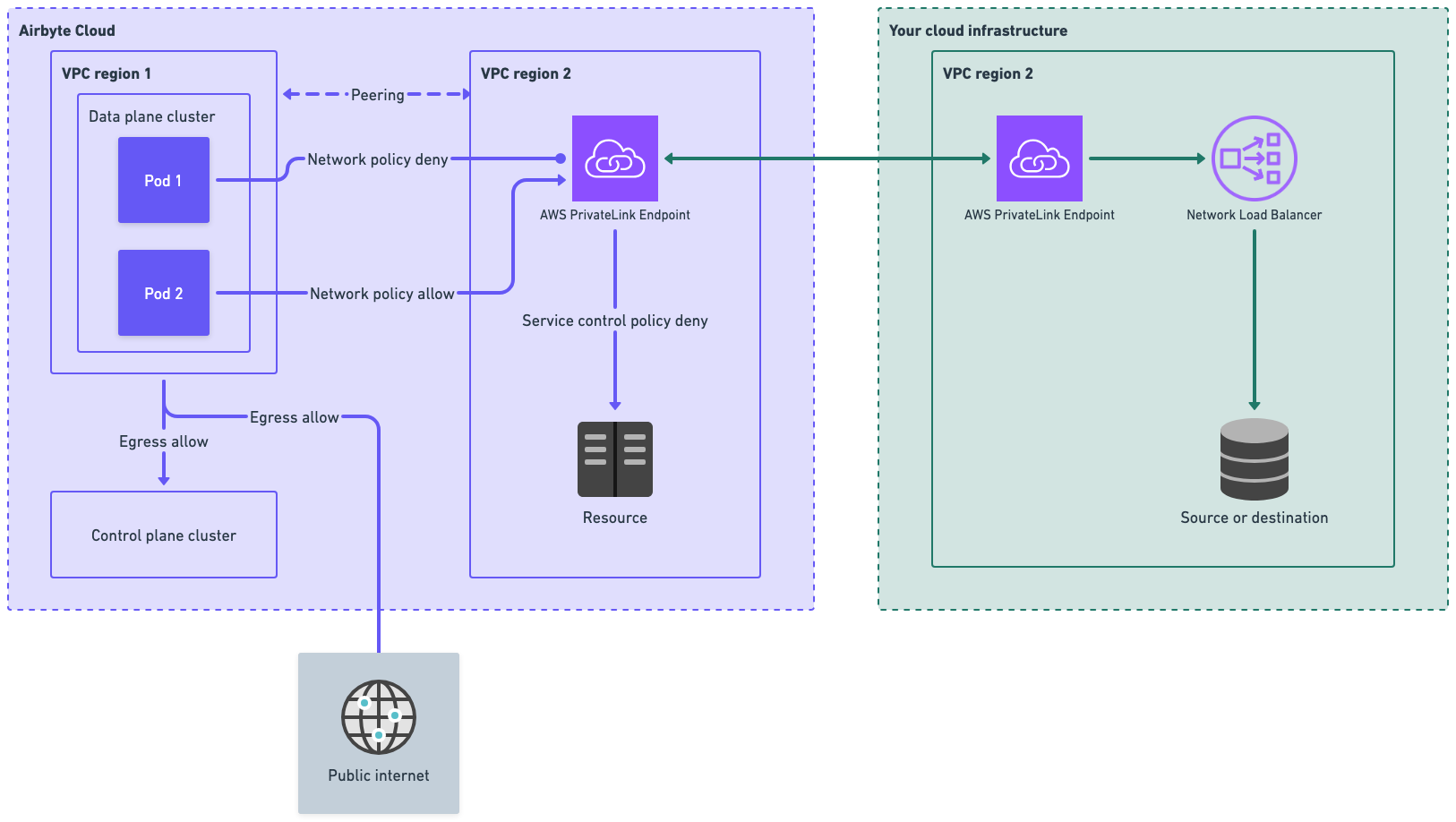
With Private Links, you create a VPC endpoint service in your cloud provider that exposes your data source or destination. Airbyte then creates a VPC endpoint that connects to your endpoint service, establishing a private network path between Airbyte's infrastructure and your resources.
When a sync runs, Airbyte routes traffic through this private connection rather than over the public internet. Your resources never need public IP addresses or internet-facing firewall rules. All communication happens within the cloud provider's internal network.
Airbyte maintains dedicated infrastructure for Private Links, ensuring that only your workspace's sync jobs can access your endpoint.
Security model
Airbyte's Private Links implementation ensures that only sync jobs from your workspace can access your Private Link endpoint. Each workspace is assigned a unique security token, and Airbyte's infrastructure enforces network-level isolation so that jobs from other workspaces cannot reach your endpoint, even if they run on shared infrastructure.
Single tenant or multi tenant
Airbyte Cloud is multi-tenant cloud software, regardless of whether you use Private Links. However, Private Links can feel like a single-tenant experience due to the lack of a shared public endpoint and strong isolation at your network boundary. With or without Private Links, all sync jobs in Airbyte use separate Kubernetes pods. This pod-level isolation further helps ensure data syncs from one organization are never exposed to another organization. Your syncs never run in their pods, and their syncs never run in your pods.
Availability and supported regions
Private Links is currently available for AWS. If you need Private Links for Azure or GCP, talk to sales so we can scope your requirements.
| Cloud provider | Name | Available |
|---|---|---|
| AWS | PrivateLink | Yes |
| Azure | Private Endpoint / Private Link | Talk to sales |
| GCP | Private Service Connect | Talk to sales |
Airbyte maintains AWS PrivateLink infrastructure in the US (us-east-1) and EU (eu-west-3). Your service can be in any AWS region. Airbyte uses cross-region PrivateLink to connect to services outside of these regions, so you don't need to relocate your infrastructure.
Cross-region connectivity
Airbyte's PrivateLink endpoints are located in us-east-1 (US) and eu-west-3 (EU). If your VPC endpoint service is in a different AWS region, AWS cross-region PrivateLink transparently bridges the connection. For this to work, you must enable cross-region support on your VPC endpoint service and add Airbyte's region to your service's supported regions list. See Cross-Region Connectivity for AWS PrivateLink for details.
Limitations
Private Links are currently limited to sources and destinations running in AWS. This includes services like Snowflake, Databricks, and PostgreSQL hosted on AWS. If you need to connect to resources outside of AWS, Private Links are not yet available.
Private Links currently support only VPC endpoint services backed by a Network Load Balancer (NLB) that you create and manage in your own AWS account. Airbyte doesn't host the NLB or the underlying service for you.
If you need a PrivateLink for an S3 bucket, talk to sales so we can scope your requirements.
For managed AWS services like RDS or Aurora, additional configuration is required to expose them via AWS PrivateLink. See Using Private Links with AWS managed services for details.
Prerequisites
Before setting up a Private Link, ensure you have the following:
-
Airbyte Cloud Private Links add-on enabled: Private Links is an add-on feature. Talk to sales to enable it for your organization.
-
AWS infrastructure: Your source or destination must be running in AWS, since Private Links is currently AWS-only.
-
Permissions to create VPC endpoint services: You need IAM permissions to create and configure VPC endpoint services in your AWS account, including:
ec2:CreateVpcEndpointServiceConfigurationec2:ModifyVpcEndpointServicePermissionsec2:DescribeVpcEndpointServiceConfigurations
-
Network Load Balancer (NLB): AWS PrivateLink requires a Network Load Balancer in front of your target service. If your service doesn't already have one, you'll need to create it as part of the setup process. This requires additional IAM permissions:
elasticloadbalancing:CreateLoadBalancerelasticloadbalancing:CreateTargetGroupelasticloadbalancing:RegisterTargets
Set up a Private Link
Step 1: Contact Airbyte
Before configuring anything, talk to sales to enable the Private Links add-on and discuss your requirements. Airbyte will confirm region availability and provide you with the AWS account ID you'll need to grant access to your endpoint service.
Step 2: Create a VPC Endpoint Service
For a complete overview of sharing services through AWS PrivateLink, see Share your services through AWS PrivateLink. The key steps for Airbyte integration are:
-
If your service doesn't already have a Network Load Balancer, create one that targets your service. See Create a Network Load Balancer in the AWS documentation.
-
Create a VPC endpoint service configuration that points to your Network Load Balancer. See Create an endpoint service in the AWS documentation.
-
If your service is in a different region than Airbyte's PrivateLink infrastructure (
us-east-1for US,eu-west-3for EU), enable cross-region support on your VPC endpoint service and add Airbyte's region to the supported regions list. See Cross-region connectivity for more information. -
Note your endpoint service name. It follows the format
com.amazonaws.vpce.{region}.vpce-svc-{id}. You provide this to Airbyte in Step 4.
Step 3: Configure permissions for Airbyte
Add Airbyte's AWS account as an allowed principal on your endpoint service. This allows Airbyte to create a VPC endpoint that connects to your service. Airbyte provides this account number for you.
See Manage permissions in the AWS documentation for instructions on adding principals to your endpoint service.
Step 4: Create the Private Link in Airbyte
Create the Private Link from your Airbyte Cloud workspace settings.
- In Airbyte Cloud, go to Workspace settings > Private Links.
- Enter a Name for the Private Link (for example,
my-production-link). - Enter your Endpoint Service Name (for example,
com.amazonaws.vpce.us-east-1.vpce-svc-05df72d283c05fbc7). - Click Create Private Link.
Airbyte creates a VPC endpoint that connects to your endpoint service.
Snowflake setup isn't fully self-serve. Airbyte handles DNS for Snowflake connectors on its side, so after you create the Private Link in this step and accept the connection request in Step 5, follow Using Private Links with Snowflake to share the configuration Airbyte needs to finish setup.
Step 5: Accept the connection request
After Airbyte creates the VPC endpoint, the connection appears as Pending Acceptance in your AWS console under VPC > Endpoint Services > Endpoint Connections. You must accept this connection request before the Private Link becomes active.
Once you accept the request, the connection status changes to Available and your Private Link is ready to use with your Airbyte connections.
Using Private Links with AWS managed services
Managed AWS services like Amazon RDS and Aurora don't natively support VPC endpoint services. To use Private Links with these services, you need to set up additional infrastructure in your own AWS account to expose them via a Network Load Balancer that you own and manage.
The general approach is almost identical to the steps above. You create an NLB that targets your RDS or Aurora endpoint, then create a VPC endpoint service that points to that NLB.
AWS provides a guide for this configuration: Access Amazon RDS across VPCs using AWS PrivateLink and Network Load Balancer.
When setting up the NLB and related infrastructure, keep the following requirements in mind:
- NLB scheme must be
internal: Do not useinternet-facing. An internet-facing NLB creates public IPs and is incompatible with AWS PrivateLink. - NLB must be in a private subnet: The subnet's route table must not have a route to an Internet Gateway.
- Target group targets must be healthy: Register the IP address of your RDS or Aurora endpoint in the target group (resolve the DNS endpoint to an IP address using
nslookup). Verify that targets show as Healthy in the AWS console. - Database security group must allow NLB traffic: Add an inbound rule to your database's security group allowing TCP traffic on the database port from the NLB's subnet CIDR. A self-referencing security group rule alone is not sufficient.
Using Private Links with Snowflake
Snowflake on AWS requires additional DNS configuration to work with Private Links, because Airbyte connectors connect using *.snowflakecomputing.com domain names. The Workspace settings UI doesn't provision this DNS, so setting up Snowflake is a two-stage process: you create the Private Link yourself, then Airbyte completes DNS provisioning on its side.
To set up Snowflake with Private Links:
- Complete Step 4: Create the Private Link in Airbyte and Step 5: Accept the connection request.
- Run
SYSTEM$GET_PRIVATELINK_CONFIGin your Snowflake account. - Talk to sales and share the output, along with the name of the Private Link you created in Step 4, so Airbyte can complete the DNS configuration.
- Once Airbyte confirms the DNS is in place, the Private Link is ready for use with your Snowflake connector.
For background on the DNS configuration involved, see How to configure Route 53 to access Snowflake via PrivateLink in the Snowflake community documentation.
IP allowlist (rare)
In most cases, Private Links eliminate the need for IP allowlisting since traffic flows through private connections. However, if you have a connection where one side uses a Private Link and the other side requires IP allowlisting (for example, a public source connecting to a destination behind a Private Link), you may need to allowlist Airbyte's IP addresses for the non-Private Link endpoint.
These IPs are separate from the normal IP allow list for Airbyte Cloud. Airbyte provides the list of IPs for your region on request.