Enterprise Flex: hybrid deployment for Airbyte
Airbyte Enterprise Flex is a hybrid deployment: a managed cloud control plane with data planes in your own infrastructure. Your records are extracted, processed, and loaded in your data plane. The control plane receives configuration and metadata; see What data leaves your network.
What is Enterprise Flex
Your organization might need to meet regulatory or internal requirements for where you process and store data, or who can access it.
- Compliance: Regulations and internal policies can define how you process and manage data.
- Data sovereignty: You might need to keep data processing and storage within a specific country or region.
- Security and operational policies: Your policies might require data to stay within infrastructure that you control.
With Enterprise Flex, Airbyte manages the control plane, including the user interface, API, Terraform provider, and orchestration. You can run self-managed data planes in your own infrastructure and use Airbyte-managed data planes for workspaces that do not need a self-managed data plane.
Control plane and data plane
| Responsibility | Control plane | Data plane |
|---|---|---|
| Operation | Airbyte manages it in Airbyte Cloud. | You manage a self-managed data plane in your infrastructure. |
| Work | Provides the user interface, APIs, Terraform provider, and orchestration. | Initiates jobs, syncs data, completes jobs, and reports job status to the control plane. |
| Records | Stores connector configuration and metadata, including table and column names. | Extracts, processes, and loads records. |
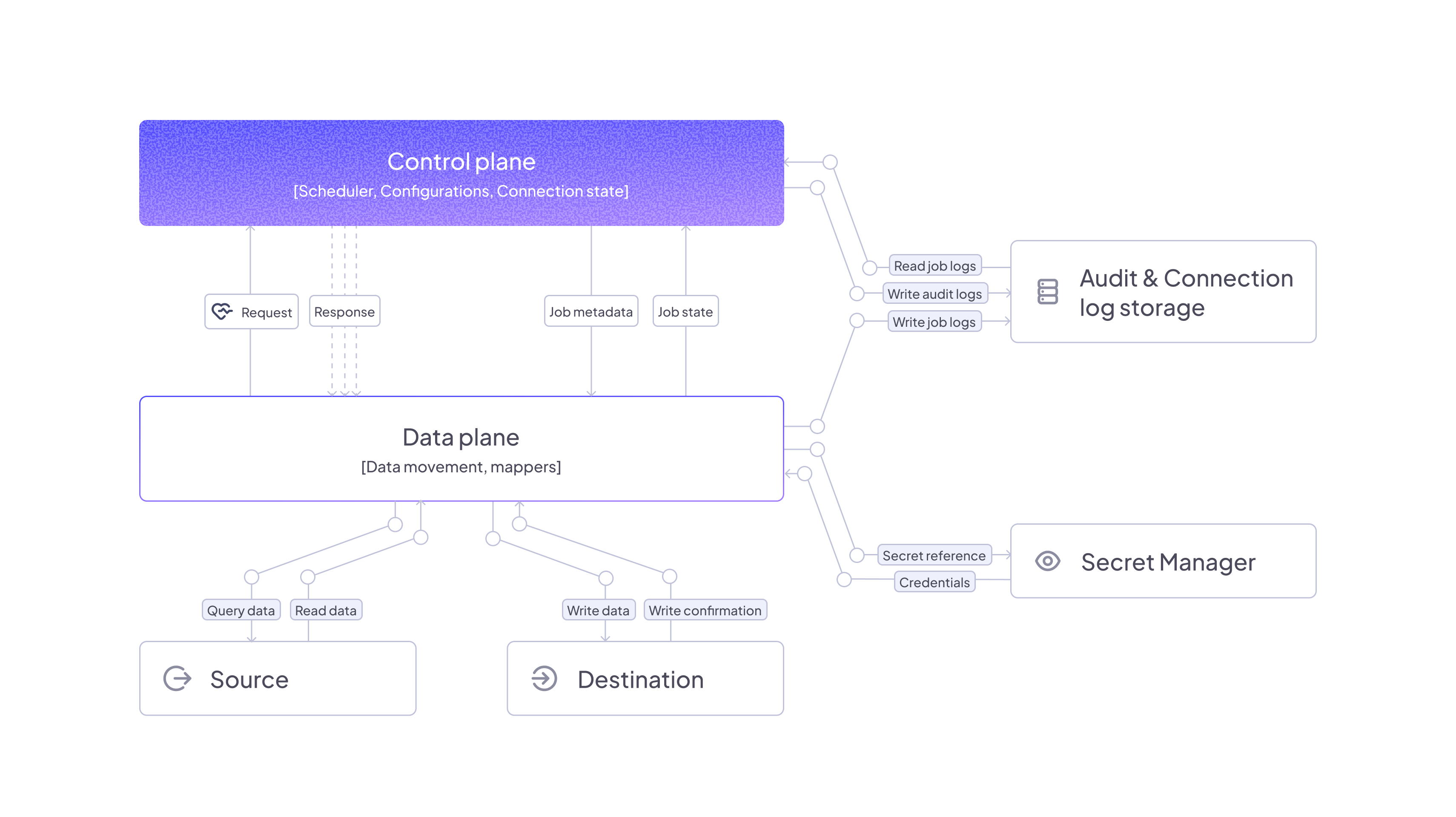
What data leaves your network
The following information reaches the control plane:
- Credentials: The control plane writes credentials you enter in the UI to your secrets manager and reads them back when syncs run. Configure the same secrets manager on the control plane and data plane so the data plane can read them.
- Connector configuration, table names, and column names: Stored by the control plane.
- Cursor and primary key values: Stored by the control plane, regardless of the data plane's location.
- Job status: Reported by the data plane to the control plane.
- Connector Builder test data: Processed through the control plane during development and testing. Published connectors use the workspace's region for syncs.
- Sync logs, if you turn this on: Sync logs appear in the Airbyte UI only if you ask Airbyte to turn this on.
The following information stays in your data plane:
- Records: Extracted, processed, and loaded in your data plane.
- Job logs and state: Stored in your data plane's storage. Data plane components write structured JSON logs to stdout starting with Helm chart version 2.1.0; collect them with your own log collector.
Network and security
Data planes send outbound HTTPS requests to the control plane at https://cloud.airbyte.com and authenticate with a data plane client ID and secret. They do not require inbound requests.
Configure the same external secrets manager on the control plane and data plane. Enterprise Flex data planes support AWS Secrets Manager, Google Secret Manager, Azure Key Vault, and HashiCorp Vault; data planes support access key authentication only. See Secrets manager requirements.
Data in transit uses TLS or other encrypted channels. For Airbyte's security practices, see Security. For certifications, compliance, and data retention, see the Airbyte Trust Center.
Supported connectors
All connectors that work on Airbyte Cloud work on Enterprise Flex. Connectors you configure in a workspace run on that workspace's data plane. Browse the connector catalog.
Connector Builder sends test data through the control plane during development and testing. On customer-owned Enterprise Flex data planes, you can't use agent access for sources or destinations, and search isn't available for connections. See Connector Builder and Sources, destinations, and connectors.
Sizing
Sizing depends on the type and size of the jobs you run. Your Airbyte Solution Architect works with you to recommend the right resource allocation for your needs.
Use Scaling Airbyte to plan capacity for your data planes. For infrastructure requirements, see the Helm prerequisites and Airbox requirements.
Self-managed data planes count toward your organization's data workers, the same as Airbyte-managed data planes. See Manage and monitor data workers.
Deployment options
Helm
Deploy with Helm to EKS on EC2, GKE on GCE (including Autopilot), or AKS. EKS on Fargate isn't supported; Airbyte recommends Helm for production workloads. See Get started with Enterprise Flex and Deploy a data plane with Helm.
Airbox
Airbox deploys a data plane on a single machine with Docker and is an option for teams with limited Kubernetes expertise. Airbox doesn't support values.yaml customization. See Deploy a data plane with Airbox.
Regions
Each workspace uses one region, which you can set in Workspace settings or with the API. Airbyte Cloud control planes run on GCP in the United States. Airbyte-managed data planes are available in the United States on GCP and in the European Union on AWS. See Set data residency.
Enterprise Flex and other plans
Enterprise Flex lets you run self-managed data planes in your own infrastructure alongside Airbyte-managed data planes. See Airbyte pricing for a full plan comparison. To upgrade, talk to sales.
An example hybrid deployment
In this example, Workspace 1 uses Airbyte's managed data plane in eu-west-3. Workspaces 2 and 3 use self-managed data planes in us-west-2 and ap-southeast-4.
- Workspace 1 handles data that can use an Airbyte-managed data plane.
- Workspaces 2 and 3 keep records in their self-managed data planes. See What data leaves your network for what reaches the control plane.

Limitations
- The control plane stores cursor and primary key values, regardless of the data plane's location. If you can't store a field's data in the United States, don't use it as a cursor or primary key. See Limitations and considerations.
- Connector Builder processes test data through the control plane during development and testing. Published connector syncs use the workspace's region. See Connector Builder data residency.
- Each workspace uses one region. See Set data residency.
- The control plane and data plane must use the same secrets manager. Data planes support access key authentication only, and changing connector secret storage causes existing connectors to fail. See Secrets manager requirements.
FAQ
What is a hybrid deployment?
Airbyte manages the control plane in Airbyte Cloud, and you run data planes in your own infrastructure. You can also use Airbyte-managed data planes for workspaces that do not need a self-managed data plane.
How does Enterprise Flex differ from other Cloud plans?
Enterprise Flex lets you run self-managed data planes in your own infrastructure alongside Airbyte-managed data planes. See Airbyte pricing for a full plan comparison.
Can I run a data plane on EKS, GKE, AKS, or Airbox?
For Helm, use EKS on EC2, GKE on GCE (including Autopilot), or AKS. EKS on Fargate is not supported. Airbox deploys a data plane on a single machine with Docker.
What is a data plane?
The data plane initiates jobs, syncs data, completes jobs, and reports job status to the control plane. It is where your records are extracted, processed, and loaded.
Does my data leave my network?
Records are extracted, processed, and loaded in your data plane. The control plane receives connector configuration and metadata, including table and column names and cursor and primary key values. Connector Builder test data passes through the control plane during development and testing.
Do data planes need inbound ports?
No. Data planes send outbound requests to the control plane and do not require inbound requests.
Can I use separate regions?
Each workspace uses one region. Set the workspace region in Workspace settings or with the API.